The BookPocket API
Your books, the people who recommended them, and your reading stats, as JSON. Use it for a script, a dashboard, or a screen on your wall. It's free.
1. Make a token
Sign in, open your profile, and choose the API tab. Give the token a name you'll recognize, like "Kitchen TRMNL", then copy it. We show it once.
A token from the API tab can read everything on your account and change nothing. If you lose it, replace it on the same tab. If something you gave it to stops being yours, revoke it.
2. Ask for your books
Every address starts with https://web.bookpocket.app/api/v1.
Send your token in an Authorization header:
curl https://web.bookpocket.app/api/v1/shelvings?status=reading \
  -H "Authorization: Bearer bp_your_token"
You get back the books you're reading, newest first:
{
  "status": "reading",
  "page": { "number": 1, "per_page": 5, "total": 1, "count": 2 },
  "shelvings": [
    {
      "id": 194,
      "status": "reading",
      "added_at": "2026-08-25T07:00:00Z",
      "prioritized_at": null,
      "format": "print",
      "cover_url": "https://covers.example/sea-of-tranquility.webp",
      "work": {
        "id": 105009,
        "display_title": "Sea of Tranquility",
        "display_publication_year": 2022,
        "display_page_count": 255,
        "authors": [ { "id": 52292, "name": "Emily St. John Mandel" } ]
      },
      "reads": [
        { "id": 81, "started_on": "2026-10-20", "finished_on": null, "rating": null, "format": "print" }
      ],
      "attributions": [
        {
          "id": 108,
          "note": "You'll love the ending.",
          "recommender": { "id": 28, "name": "Nadia Okonkwo", "kind": "person" }
        }
      ]
    }
  ]
}
-
display_titleanddisplay_page_countare what BookPocket shows. Use them rather thantitleandmedian_page_count, which are the raw catalogue data. -
cover_urlis the cover you see in the app, or null if the book has none. -
attributionssays who recommended the book. It's an empty list when nobody did. - A field with no value is null, never left out.
What you can read
Each of these is a GET request, relative to the address above.
/display- One shelf for a screen on your wall, a different view each time. See the TRMNL recipe.
/shelvings- Your books, filtered and sorted. Takes the parameters below.
/shelvings/:id- One of your books, with its reads and who recommended it.
/works/:id- A book from the catalogue, with its description and authors.
/recommenders- Your sources: the people and places your books came from.
/recommenders/:id- One source and every book they sent you.
/stats- Your reading in numbers. Add year=2025, or year=all for every year.
/stats/books- The finished books behind a figure on Stats, with year, month, rating, or source.
/series/:id- A series and its books in order.
/tags- Your own tags and the genres on your books.
/profile- Your name, picture, time zone, and sharing settings.
Filtering your books
/shelvings takes these as query parameters.
A value it doesn't recognize is ignored rather than refused, and the
response says what it applied.
status- unread, reading, paused, finished, or dnf. Leave it out for every book.
sort- added, title, status, rating, or pages, plus read on the finished shelf.
direction- asc or desc. Each sort has its own natural direction if you leave it out.
per_page- How many books on a page, up to 50. 50 if you leave it out.
page- Which page, starting at 1.
prioritized- true for only the books you marked as a priority.
recommended- true for only the books somebody recommended.
q- Words to look for in the title or author.
Recipe: a bookshelf on TRMNL
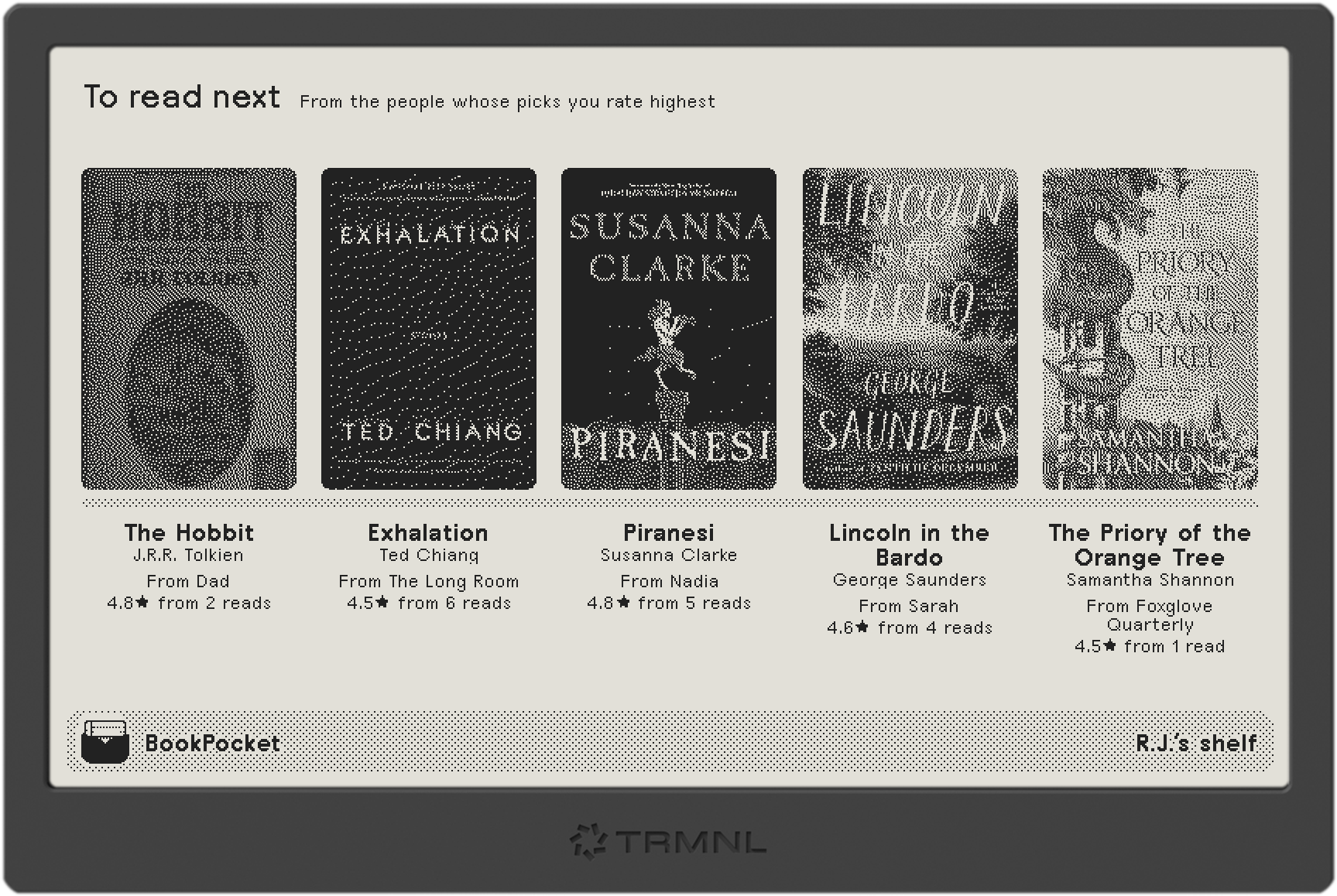
TRMNL is an e-ink screen that shows plugins you write. This one puts a shelf of covers on it, and each time it refreshes, it shows one of these at random, never the same one twice in a row:
- Reading now
- To read next, from the people whose picks you rate highest
- Your sources, each by a book of theirs you loved
- Recent activity
- Favorite recent reads, rated highly this past year
- Marked to read next
- Been waiting a while, on your list over a year from a source you rate well
- More by authors you love, unread books by writers you rate highly
- Loved a while ago, rated highly over two years ago
- On this day, finished around this date in past years
It shows a view that can fill all five places when there is one, though Reading now and On this day come up with however many they have. Each view draws its five from every book that fits, favoring the strongest, and passes over books it showed in the last day while it has others. So a screen that refreshes every 15 minutes keeps turning up books you had forgotten. Recent activity is always your latest five.
- In TRMNL, add a Private Plugin and choose the Polling strategy.
-
Set the polling URL to:
https://web.bookpocket.app/api/v1/display -
Set the polling headers to the line below, on one line, with your token in place of
bp_your_token:Authorization: Bearer bp_your_token -
Paste this into the markup editor for the full view:
{% if errors %}
<div class="layout layout--col" style="justify-content: center; align-items: center; text-align: center;">
  <span class="title">BookPocket didn't accept the token.</span>
  <span class="description">Check the polling headers, or make a new token on your profile's API tab.</span>
</div>
{% elsif books == empty %}
<div class="layout layout--col" style="justify-content: center; align-items: center; text-align: center;">
  <span class="title">Nothing on your shelf to show yet.</span>
  <span class="description">Add a book in BookPocket and it appears here.</span>
</div>
{% else %}
{% assign count = books.size %}
{% assign gaps = count | minus: 1 | times: 16 %}
{% assign cover_w = 760 | minus: gaps | divided_by: count %}
{% if cover_w > 150 %}{% assign cover_w = 150 %}{% endif %}
{% assign cover_h = cover_w | times: 3 | divided_by: 2 %}
{% assign star = '<svg viewBox="0 0 24 24" style="width: 0.9em; height: 0.9em; vertical-align: -0.1em; fill: currentColor;"><path d="M12 2l3.09 6.26L22 9.27l-5 4.87 1.18 6.88L12 17.77l-6.18 3.25L7 14.14 2 9.27l6.91-1.01z"/></svg>' %}
<div class="layout layout--col" style="justify-content: flex-start;">
  <div style="width: 100%; padding: 12px 10px 0; display: flex; align-items: baseline; gap: 12px;">
    <span class="title">{{ heading }}</span>
    <span class="description">{{ subheading }}</span>
  </div>
  <div style="flex: 1 1 auto; width: 100%; display: flex; flex-direction: column; justify-content: center;">
  <div style="display: flex; align-items: flex-end; gap: 16px; width: 100%; padding: 0 10px;">
    {% for book in books %}
      <div style="flex: 1 1 0; min-width: 0; display: flex; justify-content: center;">
        {% if book.cover_url %}
          <img src="{{ book.cover_url }}" class="image-dither" style="width: {{ cover_w }}px; height: {{ cover_h }}px; object-fit: cover; border-radius: 6px;" alt="">
        {% else %}
          <div class="bg--gray-75" style="width: {{ cover_w }}px; height: {{ cover_h }}px; border-radius: 6px; display: flex; align-items: center; justify-content: center;">
            <span class="title" style="font-size: {{ cover_w | divided_by: 3 }}px; line-height: 1;">{{ book.initial | default: book.title | slice: 0 | upcase }}</span>
          </div>
        {% endif %}
      </div>
    {% endfor %}
  </div>
  <div style="width: 100%; padding: 0 10px; margin-top: 6px;">
    <div class="bg--gray-70" style="height: 6px; border-radius: 3px; margin: 0 calc(((100% - {{ gaps }}px) / {{ count }} - {{ cover_w }}px) / 2);"></div>
  </div>
  <div style="display: flex; gap: 16px; width: 100%; padding: 8px 10px 0;">
    {% for book in books %}
      <div style="flex: 1 1 0; min-width: 0; text-align: center;">
        <span class="title{% if count > 4 %} title--small{% endif %}" style="display: -webkit-box; -webkit-line-clamp: 3; -webkit-box-orient: vertical; overflow: hidden; overflow-wrap: anywhere; hyphens: auto;" lang="en">{{ book.title }}</span>
        <span class="description" style="display: -webkit-box; -webkit-line-clamp: 2; -webkit-box-orient: vertical; overflow: hidden;">{{ book.author }}</span>
        {% if book.caption_lines %}
          {% for line in book.caption_lines %}<span class="label label--small" style="display: block;{% if forloop.first %} margin-top: 4px;{% endif %}">{{ line | replace: "★", star }}</span>{% endfor %}
        {% elsif book.caption %}
          <span class="label label--small" style="display: block; margin-top: 4px;">{{ book.caption | replace: "★", star }}</span>
        {% endif %}
      </div>
    {% endfor %}
  </div>
  </div>
</div>
{% endif %}
<div class="title_bar">
  <img class="image" src="https://web.bookpocket.app/logo-mark-black.svg" alt="">
  <span class="title">BookPocket</span>
  {% if reader_name %}<span class="instance">{{ reader_name }}’s shelf</span>{% endif %}
</div>
What the shelf sends
{
  "view": "trusted",
  "heading": "To read next",
  "subheading": "From the people whose picks you rate highest",
  "reader_name": "R.J.",
  "books": [
    {
      "shelving_id": 194,
      "work_id": 105009,
      "title": "Sea of Tranquility",
      "full_title": "Sea of Tranquility",
      "author": "Emily St. John Mandel",
      "cover_url": "https://covers.example/sea-of-tranquility.webp",
      "initial": "S",
      "caption": "From Nadia · 4.8★ from 5 reads",
      "caption_lines": ["From Nadia", "4.8★ from 5 reads"]
    }
  ]
}
-
titleis the title before any colon, which fits under a cover.full_titleis the whole thing. -
initialis the letter to draw whencover_urlis null, skipping a leading "The", "A", or "An". -
captionsays why the book is on this shelf, or is null.caption_lineshas the same words split into short lines, for a narrow column under a cover. -
limit=takes 1 to 8 books (5 if you leave it out). The template sizes the covers to fit however many arrive. Addview=with one ofreading,trusted,sources,activity,favorites,priority,waiting,authors,loved, oron_this_dayto show one view every time, which helps while you adjust the layout.
Limits and errors
- Each token can make 60 requests a minute. Past that you get a 429. Wait a minute and try again.
- 401 means the token is missing, mistyped, or revoked. Make a new one.
-
403 with
"code": "read_only_token"means you tried to change something. Tokens from the API tab can only read. - 404 means there's nothing at that address for you, including a book or source on somebody else's account.
- Version 1 doesn't change in ways that break what you've built. New fields may appear, so ignore ones you don't use.
Built something?
We'd love to see it. Email support@bookpocket.app with a link or a photo.